用 Hugo 和双栈 CDN 搭建个人网站
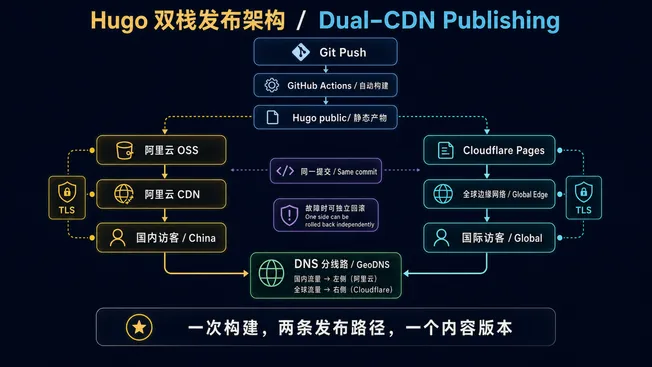
同一份 Hugo 静态产物,同时发布到阿里云 OSS/CDN 与 Cloudflare Pages,再由 DNS 分线路把国内外访问导向不同边缘网络。
为什么选 Hugo
做个人博客选框架,我的第一标准是维护成本低——不想三个月后因为 npm 依赖地狱放弃写作。
Hugo 是单二进制文件,无需 Node.js,构建几千篇文章只需 1-2 秒,Blowfish 主题开箱就有暗色模式、全文搜索、多语言、RSS、Open Graph、阅读时间估算。日常写作只需碰 Markdown。
整体架构
这张图同时画出两条不同的路径:从 Git Push 向下看是发布路径,国内外访客经 GeoDNS 进入各自 CDN 则是请求路径。两边必须来自同一次构建,才能避免内容版本漂移。
这套方案全年花费约 ¥212:
- 域名
zhuoqidev.com:¥85/年(已买 3 年) - 函数计算资源包(ICP 备案载体):¥101/年(¥126 年包叠加 8 折优惠)
- 阿里云 CDN 100GB 流量包:¥20/年
- OSS 存储:~¥6/年
- Cloudflare Pages:¥0
ICP 备案那些事
国内域名备案需要”备案载体”(服务器 IP)。不买服务器的话,阿里云函数计算资源包(¥101/年)可以作为备案载体,拿到备案服务码。
备案周期:阿里云初审 1-5 个工作日 + 管局审核 10-20 个工作日,整体约 3-6 周。等备案期间正好把网站搭完。
DNS 分线路解析
阿里云云解析免费版支持”境内/境外”两条线路:
- 境内 → 阿里云 CDN CNAME
- 境外(默认)→ Cloudflare Pages CNAME
这样国内用户走备案过的阿里云节点,海外用户走 Cloudflare 免费全球 CDN,一套域名两套加速。
部署流程
推送到 GitHub → Actions 自动 hugo build → 并行上传到 OSS 和 Cloudflare Pages。
整个流程大约 2-3 分钟,文章发布基本无感。
后来补上的细节:能看清 4K 架构图的图片预览器
技术文章里的架构图经常有很多小字。Blowfish 自带的 medium-zoom 只会把图片放大到适合屏幕,再点一次便关闭;原图即使是 4K,读者也不能继续按百分比放大、拖动查看局部。因此我后来把它替换成了一个站点级图片查看器。
实现没有引入新的前端依赖:在 hugo.yaml 中关闭主题自带缩放,将 assets/js/image-viewer.js 和对应 CSS 加进 Hugo Pipes 的资源管线。构建时,它们会和其他资源一起压缩、生成内容指纹,再作为同一份静态产物发布到两套 CDN。脚本只接管 .article-content img:not(.nozoom),所以正文配图可以预览,头像、图标和卡片封面不会被误触发。
查看器打开后先根据视口与图片原始尺寸计算“适应屏幕”的比例;滚轮或按钮缩放时,以鼠标所在位置为锚点重新计算位移,让读者指着哪里就放大哪里。放大后的图片可以拖动,位移会限制在有效边界内。触摸端用 Pointer Events 同时跟踪两个触点,实现双指缩放;键盘则支持 +、-、方向键、0(适应屏幕)、1(原始尺寸)和 Esc。单击图片或周围空白处也能退出,拖动超过阈值则不会误关。界面显示实时百分比,并根据文章语言切换中英文标签。
你可以在这篇 Codex Agent 设计解读中点击任意 4K 配图实际体验。这个小功能也说明了静态站点的一个好处:交互逻辑仍然只是可缓存的 JS 和 CSS,发布拓扑完全不需要改变。
后续文章会深入 Agent 架构设计、记忆层选型、多 Agent 编排等话题。