
Three approaches dominate the landscape: RAG (vector retrieval), LLM Wiki (structured knowledge injection), and plain-text context memory (the CLAUDE.md / Cursor Rules pattern). Each has vocal advocates. But picking wrong is expensive — do RAG too light and it’s a noise generator; do plain text too heavy and it’s a token incinerator.
Here’s a decision framework you can use today.
Start with the system boundaries. The important distinction is not the database brand; it is when retrieval happens, how much content enters context, and who owns writing and maintenance.
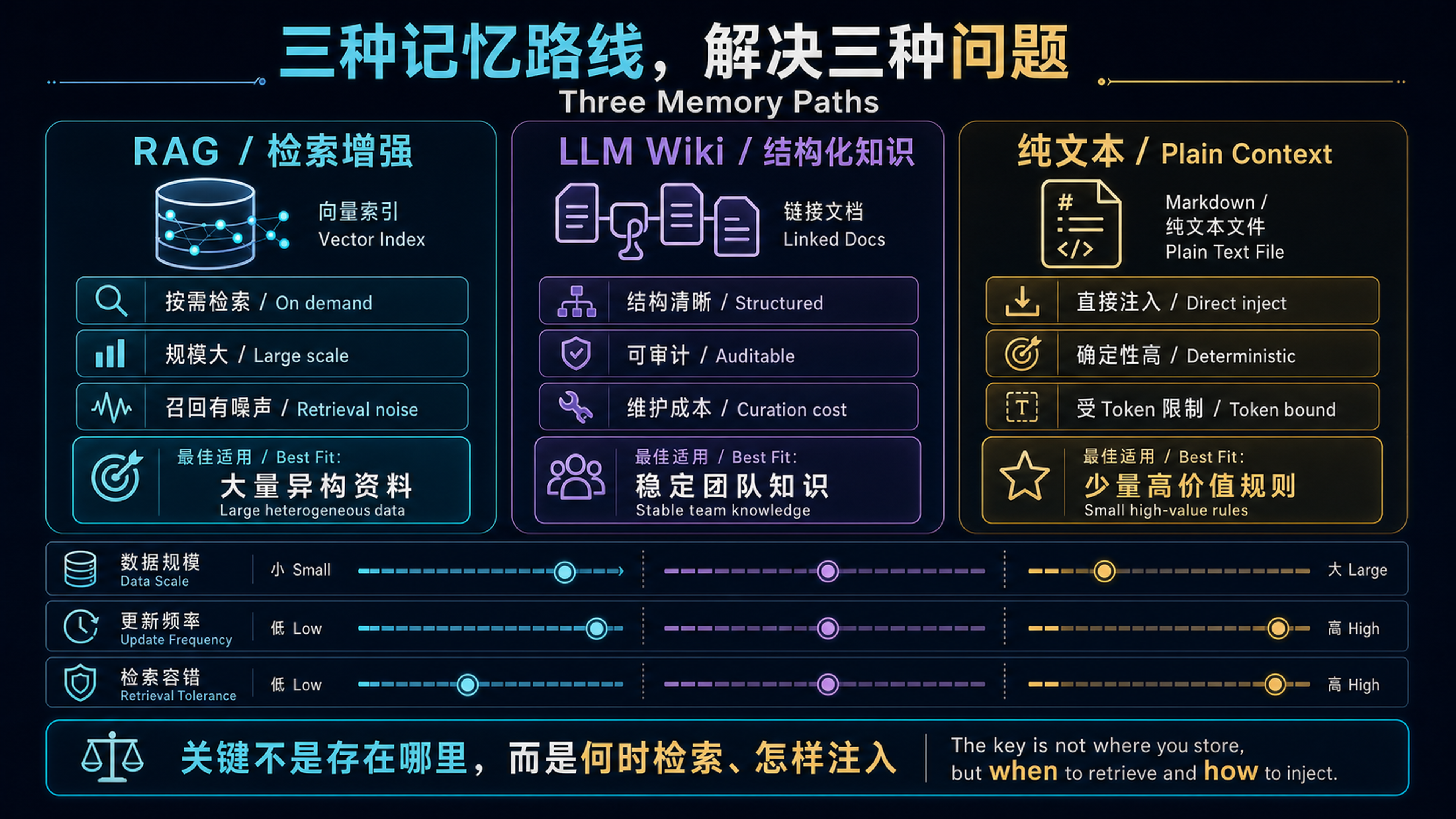
What Each Approach Actually Is#
| Approach | Core Mechanism | Examples |
|---|---|---|
| RAG | Vector retrieval → top-k chunks → inject into prompt | Mem0, Zep, LangChain RAG, Cursor Codebase Index |
| LLM Wiki | Structured docs → full or on-demand injection into system prompt | Claude Projects, GPTs Knowledge, Notion AI |
| Plain Text | Markdown/text files → directly concatenated into system prompt | CLAUDE.md, Cursor Rules, AGENTS.md, Devin Knowledge |
The key difference isn’t where data is stored — it’s how it’s retrieved and when it’s injected.
Decision Matrix#
| Dimension | RAG | LLM Wiki | Plain Text |
|---|---|---|---|
| Data volume | Large (>100 docs) | Medium (10–100 docs) | Small (<10 files, <200 lines) |
| Update frequency | High, real-time or near-real-time | Medium, weekly/daily | Low, project-level conventions |
| Retrieval need | Semantic matching (“find the most relevant paragraph”) | Structural navigation (“see chapter 3, section 4”) | None, full-load |
| Latency | +50–500ms (embed + retrieve + rerank) | 0 (preloaded) or +100ms (on-demand fetch) | 0 (fully in prompt) |
| Token cost | Low (only relevant chunks injected) | Medium (per-chapter injection) | High (entire file every call) |
| Maintainability | Low (chunk strategy, embedding model, retrieval params) | Medium (document structure needs upkeep) | High (it’s Markdown — edit and commit) |
| Explainability | Low (“why was this chunk retrieved?”) | High (“because you asked about chapter 3”) | Highest (everything is visible) |
| Hallucination risk | High (retrieval noise → bad context → hallucination) | Low | Low |
| Best for | Support KBs, codebase search, large-scale doc QA | Project docs, product manuals, compliance KBs | Coding conventions, project rules, personal preferences |
When to Use RAG#
RAG is not a silver bullet. Only reach for RAG when your data genuinely exceeds prompt capacity. If you have 20 documents, shoving them all into the prompt beats RAG every time — the cost of retrieval noise far exceeds the token savings.
RAG makes sense when:
- You have >100 documents and users only care about 1–3 per query
- You need semantic matching, not keyword matching
- Your data updates in real time (e.g., connected to a live database)
- You can tolerate occasional irrelevant retrievals
Common RAG failure modes:
- Building a vector DB for 10 documents — retrieval noise > signal gain
- Arbitrary chunk sizes — too small loses context, too large kills precision
- Skipping reranking — irrelevant chunks in top-k poison the model
- Mismatched embedding and generation models — semantic space misalignment
Rule of thumb: first, try to fit everything relevant into the prompt. Only go RAG when it genuinely won’t fit. This order matters — RAG is a last resort, not a default.
When to Use LLM Wiki#
An LLM Wiki is structured documentation that the model can reference on-demand or in full. Unlike RAG, it doesn’t rely on vector similarity. Unlike plain text, it isn’t dumped wholesale — it’s a “table of contents” with actual content behind it.
LLM Wiki fits when:
- Your knowledge has clear hierarchical structure (API docs, product manuals, compliance rules)
- Users need to “flip to a section” rather than “search for a snippet”
- You need human review and version control (critical for compliance)
Claude Projects’ Project Knowledge and GPTs’ Knowledge feature are canonical LLM Wiki implementations.
LLM Wiki vs RAG — the essential difference:
RAG says “I think these chunks match your question.” LLM Wiki says “Here’s the table of contents. Which chapter do you need?” The former relies on semantic similarity; the latter on structural navigation. The former can guess wrong; the latter can’t — but it requires the user or Agent to know which chapter to open.
When to Use Plain Text Context Memory#
This is the CLAUDE.md / Cursor Rules / AGENTS.md pattern. One Markdown file, injected in full into the system prompt every call. It sounds primitive. In the right context, it’s optimal.
Why the “dumb” approach often wins:
- Auditable — every change is a
git diff - Version-controlled — memory has git history; you can roll back to Tuesday
- Zero latency — no embedding, no retrieval, straight concatenation
- Zero noise — every word you wrote is in the prompt; no “wrong chunk retrieved”
- Harder to prompt-inject — content is human-written, not AI-auto-generated
Cursor 1.2 adding mandatory user approval for Memories, and Devin defaulting to suggestion-only — these are post-prompt-injection design consensus. Plain text memory doesn’t require “trusting what the AI remembered” because every line was written by a human.
Plain text shines for:
- Project-level conventions (“We use Java 17, Spring Boot 3.x”)
- Coding standards (“No Lombok, use records”)
- Personal preferences (“Answer in Chinese, code comments in English”)
- Agent behavior constraints (“Confirm before invoking tools”)
Plain text fails when:
- Data exceeds ~200 lines — eats too much context window
- Knowledge needs frequent updates — every change requires manual file edits
- Knowledge is shared across projects — copy-paste leads to divergence
The Decision Tree#
| |
The Mistake Everyone Makes#
Many teams deploy all three simultaneously:
Three systems injecting into the same prompt. The result:
- Token costs explode
- Contradictory information (plain text says Go, stale Wiki says Python)
- Debugging becomes “which chunk caused this answer?”
The fix: pick one as the primary memory layer. Use the others only when the primary one demonstrably falls short. For individual developers and teams under 10 people, plain text + an LLM Wiki is almost always enough. RAG is for when you scale past that.
Relationship to the LLM Memory Research#
This article is the engineering companion to Why LLMs Have No Memory. That report covers the four-layer stack (Bare LLM → In-Architecture Memory → Long Context → Agent Memory Layer). This post focuses entirely on L4 Agent Memory Layer selection.
One more time for Karpathy’s analogy, because it’s too useful:
Weights = ROM (burned in at training, static) Context Window = RAM (directly addressable during inference) KV Cache = Working Memory (formed at test-time) External Storage = Disk (persistent but requires retrieval)
Your choice determines what your Agent’s “hard drive” looks like — a fast SSD (plain text), a mountable filesystem (LLM Wiki), or a database with a search engine (RAG).
Summary#
| If you have… | Choose |
|---|---|
| Small data, low change frequency, need auditability | Plain Text Context |
| Structured knowledge, need chapter-level referencing | LLM Wiki |
| Large data, need semantic search, can tolerate retrieval noise | RAG |
No silver bullets. But one iron rule: avoid RAG until you actually need it — and when you do, you’ll know.