
  1. Home/
  2. Posts/

Embedding CSS Animation Demos in Hugo Articles

··144 words· 1 min·
Hugo shortcodes make it easy to embed live code demos. Here are three ways:

The diagram first separates their boundaries: a native shortcode, a CodePen iframe, and a CodeSandbox app serve different complexity levels and execute code in different places.
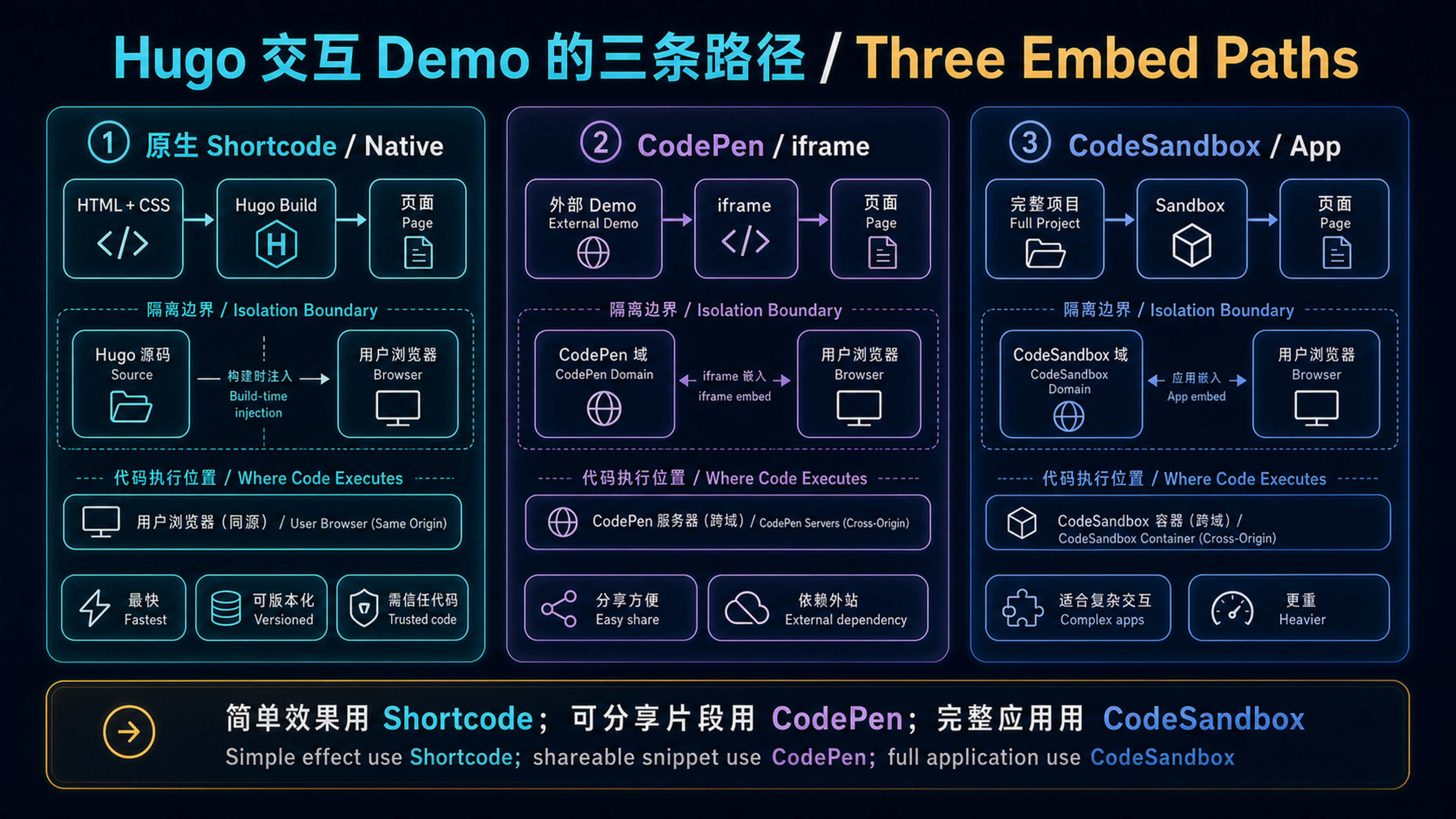
Three ways to embed an interactive demo in a Hugo article
Three embed paths: prefer a native shortcode for simple, versioned effects; CodePen for shareable snippets; and CodeSandbox for a complete interactive application.

1. Inline CSS Demo (No External Service)
#

A spinning loader animation, right in the article:

Pure CSS Spinner

A gradient text animation:

CSS Gradient Text

2. Embed CodePen
#

If you already have CodePen creations, embed them with a single shortcode:

1
{{< codepen id="yourPenID" height="400" tab="result" >}}

3. Embed CodeSandbox
#

For React / Vue components, use CodeSandbox:

1
{{< codesandbox id="yourSandboxID" height="450" view="preview" >}}

These three shortcodes cover most code demo scenarios — no extra tools needed.

Liu ZhuoQi
Author
Liu ZhuoQi
AI 应用开发工程师(Agent 方向)。使用 Go、Python 与 React 将 Agent 能力做进真实产品,记录从开发、测试到生产交付的实践。

Related

在 Hugo 文章里内嵌 CSS 动画 Demo

··63 字· 1 分钟
Hugo 用 shortcode 可以很优雅地内嵌代码演示。这里展示三种方式: 先用一张图确定边界:原生 shortcode、CodePen iframe 和 CodeSandbox 分别适合不同复杂度,也把代码放在不同的执行与隔离位置。 三条嵌入路径:简单且需要版本控制的效果优先用原生 shortcode;可分享片段适合 CodePen;完整交互应用再使用 CodeSandbox。 1. 内联 CSS demo(无需外部服务) # 直接在文章里跑一个旋转加载动画: 纯 CSS 旋转加载器 一个渐变色文字动画:

Building a Personal Site with Hugo and Dual-Stack CDN

··375 words· 2 min
One Hugo artifact is published to both Alibaba Cloud OSS/CDN and Cloudflare Pages, while geo-aware DNS sends domestic and international visitors to different edge networks. Why Hugo # When picking a framework for a personal blog, my top criterion was low maintenance cost — I didn’t want to abandon writing three months later because of npm dependency hell.

用 Hugo 和双栈 CDN 搭建个人网站

··115 字· 1 分钟
同一份 Hugo 静态产物,同时发布到阿里云 OSS/CDN 与 Cloudflare Pages,再由 DNS 分线路把国内外访问导向不同边缘网络。 为什么选 Hugo # 做个人博客选框架,我的第一标准是维护成本低——不想三个月后因为 npm 依赖地狱放弃写作。 Hugo 是单二进制文件,无需 Node.js,构建几千篇文章只需 1-2 秒,Blowfish 主题开箱就有暗色模式、全文搜索、多语言、RSS、Open Graph、阅读时间估算。日常写作只需碰 Markdown。 整体架构 # 这张图同时画出两条不同的路径:从 Git Push 向下看是发布路径,国内外访客经 GeoDNS 进入各自 CDN 则是请求路径。两边必须来自同一次构建,才能避免内容版本漂移。 Hugo 双栈发布:GitHub Actions 只构建一次,产物分别上传到阿里云 OSS/CDN 与 Cloudflare Pages;GeoDNS 决定用户走哪条访问路径,而提交版本保持一致。 这套方案全年花费约 ¥212: